Jugar
Impulsado por EmulatorJS · Arcade
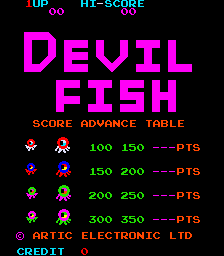
Videojuego Arcade publicado hace 44 años: Pez Diablo (c) 1982 Artic Electronics. El jugador controla a Sea Dog, que debe alimentar a Devil Fish para que queden atrapados en los distintos pasajes del laberinto, ya que estarán demasiado gordos para avanzar. Cuando quedan atrapados, Sea Dog debe tocarlos. Inmediatamente después, aparecerá una pequeña casa en el centro del laberinto. Tócalo y se revelará una parte de un dibujo. Repita este procedimiento hasta que se revele la imagen completa y Sea Dog pasará al siguiente nivel. - TÉCNICO - CPU principal: Zilog Z80 (@ 3.072 Mhz) Sonido CPU: Zilog Z80 (@ 1.78975 Mhz) Chips de sonido: (2x) Instrumento general AY8910 (@ 1,78975 Mhz) Jugadores: 2 Control: palanca de mando de 4 direcciones Botones: 1 -TRIVIA- Devil Fish se estrenó en marzo de 1982. Vision lanzó un pirata de este juego en 1984 en el hardware Galaxian. - PUNTUACIÓN - Matar un pulpo pequeño tipo 1: 100 puntos. Matar un pulpo grande tipo 1: 150 puntos. Matar un pulpo pequeño tipo 2: 150 puntos. Matar un pulpo grande tipo 2: 200 puntos. Matar un pulpo pequeño tipo 3: 200 puntos. Matar un pulpo grande tipo 3: 250 puntos. Matar un pulpo pequeño tipo 4: 250 puntos. Matar un pulpo grande tipo 4: 300 puntos. - CONSEJOS Y TRUCOS - * Intenta atraer a más de un pulpo a la vez hacia una puerta para aumentar tu puntuación. * No te demores demasiado en ninguna pantalla ya que la siguiente pantalla comenzará con enemigos más rápidos. * Espera al otro lado de una puerta donde sabes que el pulpo que te persigue quedará atrapado y retíralo tan pronto como se atasque. Si había otro pulpo cerca detrás del muerto, retrocede sobre la puerta y mátalo cuando se quede atascado.
Player layout in our catalog: 2P alt.
If you are exploring by feel rather than by title, jump from the tags above into the matching genre rooms, or return to the Arcade hall for the full wall.
Open Play on this page to start Devil Fish. Keyboard, USB/Bluetooth pads, and the on-screen touch gamepad all work inside the emulator bar. Save states and fullscreen live on that same bar so you can pause mid-session and resume later.
Player layout on this cabinet: 2P alt.
Genre tags on Classic Arcade Games: Maze, Arcade.
Nearby cabinets you may also open from this hall (each on its own play page):BnB Arcade, Vs. Battle City, Crush Roller (set 1), Dangerous Dungeons (set 1), Digger Man (prototype), Domino Man, The Electric Yo-Yo (set 1), Eyes (US set 1), Inferno (Williams), Kram (set 1), Mad Donna (Tuning, set 1), Money Money (set 1)
Yes. Classic Arcade Games hosts Devil Fish as a Arcade cabinet you can start on this page. The emulator loads in the browser; you do not need to install a separate app.
Arcade stick feel: Arrow keys for the joystick, X/Z (and nearby keys) for buttons, Enter=Start. USB / Bluetooth pads map cleanly; six-button fighters use the face-button cluster.
Our catalog tags Devil Fish under Maze, Arcade. Open those genre rooms from the tags on this page to find more playable cabinets in the same feel.
Copia el código iframe de abajo para insertar este juego en tu sitio.
<iframe src="https://es.classicarcade.games/games/arcade/devilfsh?embed=1" width="800" height="600" allowfullscreen allow="gamepad; autoplay; fullscreen"></iframe>